Introduction
We’ve all heard the phrase: a picture paints a thousand words. But what if a picture could literally contain those words and more?
Back in my earlier post, I shared an experiment I’d started called Colour Glyphs — a way of encoding data using coloured blocks instead of black and white squares.
The idea was simple: what if machine-readable codes could be expressive, creative, and compact, not just functional?
Since then, I’ve taken the concept through an MVP, added framing headers, even tested type-awareness, and now I’ve reached a natural conclusion point. This post wraps it all up.
From Bytes to Colours
Here’s how it works:
- Take any file text, MP3, an ID, even a URL.
- Split the bytes into smaller 4-bit units called nibbles.
- Map each nibble to one of sixteen colours in a fixed palette.
- Arrange them into a square grid with a quiet white border.
- Export the result as an image.
The decoder simply reverses the process, reading each colour back into nibbles and reassembling the original file.
In short: data in → colour out.
A Real Example
For this demo, I chose the worst file type for this as printing the text would be just as good but it’s the concept that works with any file type (as long as it’s given an identifying code. I took a 30-byte text file containing just one line:
Test Text Document ColorGlyph
Encoded as a Colour Glyph, those 30 bytes transform into a grid of colours:
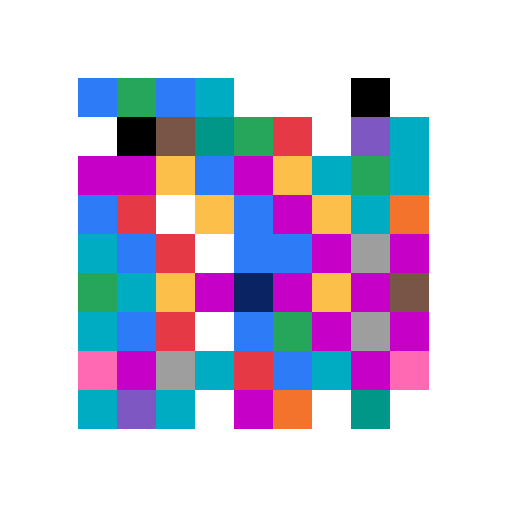
What once lived as invisible binary now exists as something you can see, print, or even hang on a wall.
Painting With Structure: Frame Headers
If we stopped here, the colours alone wouldn’t be enough. How would a decoder know:
- where the data starts and ends?
- what kind of content it is?
- whether the data is intact?
That’s where frame headers come in. Think of them as the invisible brushstrokes that give the picture its meaning.
Every Colour Glyph begins with a structured header:
| Field | Purpose |
|---|---|
| Magic Bytes | Marks this as a Colour Glyph (CG) |
| Version | Which format version is in use |
| Type | What kind of data (text, URL, binary, etc.) |
| Length | Number of bytes in the payload |
| CRC32 | A checksum to ensure integrity |
| Payload | The file’s actual data |
| Padding | Extra filler to square the grid |
For our example file, the header declared:
- This is a Colour Glyph (
CG) - Version 0 format
- Type = UTF-8 text
- Length = 30 bytes
- CRC = checksum of the text
When decoded, the glyph reliably reconstructs the exact string:
Test Text Document ColorGlyph
Error Correction: The Next Layer of Paint
Even with structure, a single smudge or blurred square could break decoding. The solution is Reed–Solomon error correction, the same method that keeps CDs, QR codes, and spacecraft signals usable even when damaged.
Adding Reed–Solomon means:
- Misread squares can be corrected.
- Missing chunks can be reconstructed.
- Designers can balance payload size against robustness.
It’s like painting backup colours into the glyph so it can heal itself when parts are lost.
Why Does This Matter?
Because once data lives as a picture, new possibilities emerge:
- Digital passports: colourful stamps for tours or memberships
- Creative puzzles and games: codes that are both art and information
- Branding and design: expressive alternatives to black-and-white QR codes
- Compact data sharing: small, portable messages embedded in posters or print media
Each glyph carries both utility and personality.
What’s Next? (Or Not Just Yet)
The natural next step would be adding error correction (Reed–Solomon) so Colour Glyphs can survive smudges, blur, or missing squares — just like QR codes do. That’s definitely possible, but it’s a bigger leap.
For now though, I’m happy to call this experiment “signed off”. It’s a neat proof-of-concept that I may revisit in the future, but it’s not something I’m actively working on right now.
Closing Thought
A picture has always been worth a thousand words. With Colour Glyphs, a picture can be those words and more.
For me, this was about exploring how far we could push a simple idea: could we take raw data and make it visual, expressive, and portable? The answer is yes. And while I may leave Colour Glyphs here for now, I think the door is open for them or something like them to play a role in how we share offline data in the future.
If you’ve got thoughts, ideas, or want to play with the MVP kit, I’d love to hear from you. Otherwise, consider this chapter closed (for now).
Leave a Reply